On this page 11 sections
- What is new in the Galaxy S line?
- Which models, and how to tell them apart?
- What should you know about Galaxy S screens?
- Screen with frame or without?
- How do you diagnose and replace a charging port?
- Which battery fits my Galaxy S?
- How do you handle Galaxy S back glass and cameras?
- What should you test after a Galaxy S repair?
- Frequently asked questions
- Related guides
- Sources
Galaxy S repairs mostly involve the OLED screen assembly, battery, charging port board and back glass. Read the SM model code first, because names like S25 Edge and S25+ hide different parts. Order by that code, confirm whether the screen comes in a frame, and check US vs international versions for flex cables. Model-matched Galaxy S parts are listed on the Parts4Cells Galaxy S series page.
What is new in the Galaxy S line?
The newest model is the Galaxy S26 FE. Samsung announced it on August 27, 2026, with US sales at Samsung.com, carriers and retailers from September 4, 2026. It joins the Galaxy S26, S26+ and S26 Ultra in the current line.
For the bench, Samsung lists the S26 FE with a 6.7 inch FHD+ Dynamic AMOLED 2X screen and a 4,900 mAh typical battery (4,755 mAh rated). Its US model code is SM-S741U. Treat it as its own phone and order its screen, battery and back cover by that code.
Which Galaxy S models do shops see, and how do you tell them apart?
Demand follows the installed base. Phones two to four years old come in most often, because they are out of their original warranty but still worth fixing. Before you quote, open Settings > About phone and read the model number. On a phone that will not power on, check the box label or the carrier account. The first part of the code identifies the model; the letters after it mark color, storage and carrier, and do not change which screen or battery fits.
| Model | US model code starts with |
|---|---|
| Galaxy S26 FE | SM-S741U |
| Galaxy S26 Ultra | SM-S948U |
| Galaxy S26+ | SM-S947U |
| Galaxy S26 | SM-S942U |
| Galaxy S25 FE | SM-S731U |
| Galaxy S25 Edge | SM-S937U |
| Galaxy S25 Ultra | SM-S938U |
| Galaxy S25+ | SM-S936U |
| Galaxy S25 | SM-S931U |
| Galaxy S24 FE | SM-S721U |
| Galaxy S24 Ultra | SM-S928U |
| Galaxy S24+ | SM-S926U |
| Galaxy S24 | SM-S921U |
| Galaxy S23 FE | SM-S711U |
| Galaxy S23 Ultra | SM-S918U |
| Galaxy S23+ | SM-S916U |
| Galaxy S23 | SM-S911U |
| Galaxy S22 Ultra | SM-S908U |
| Galaxy S22+ | SM-S906U |
| Galaxy S22 | SM-S901U |
| Galaxy S21 FE | SM-G990U |
| Galaxy S21 Ultra | SM-G998U |
| Galaxy S21+ | SM-G996U |
| Galaxy S21 | SM-G991U |
Codes taken from Samsung US business MSRP price files (March 2022, December 2023, October 2024, December 2025 and September 2026) and Samsung US store listings, checked November 8, 2026. International versions use a different letter after the number.
Three patterns catch shops out:
- The S26 skips a number. The Galaxy S26 is SM-S942U, while the S26+ is SM-S947U and the S26 Ultra is SM-S948U. Do not search for "S941".
- The S25 Edge sits between the S25+ and the Ultra. SM-S937U is the Edge, SM-S936U the S25+ and SM-S938U the S25 Ultra. One wrong digit means the wrong screen.
- FE models use a 7 series code. The S23 FE to S26 FE run SM-S711U, SM-S721U, SM-S731U and SM-S741U. The S21 FE is older and uses SM-G990U.
What should you know about Galaxy S screens?
Every Galaxy S model uses an OLED display. Replacement options usually include:
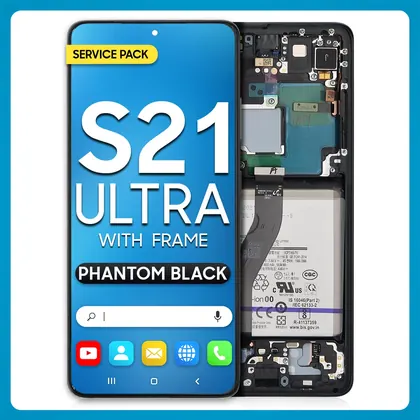
- Service pack assemblies: a new screen distributed in Samsung service packaging, often pre-installed in the frame. Faster to fit and closest to factory behavior. Listings name the model code in the title, as in this Samsung service pack screens category.
- OEM pulls: original screens removed from other devices and tested. Lower cost with original display behavior; cosmetic condition varies.
- Aftermarket OLED: third-party OLED panels. Cheaper, with differences in brightness, color and fingerprint behavior.
For the full comparison, read Galaxy screen options.
Screen with frame or without?
A "with frame" assembly arrives bonded to the midframe. You transfer the board, battery and small parts into it. That avoids separating glued OLED panels, which is where most cracked replacement screens happen. Without frame is cheaper but needs more bench time and a steady hand with heat. For busy counters, the frame version usually pays for itself.
How do you diagnose and replace a Galaxy S charging port?
Rule out the cable, debris and moisture before you open the phone, because Samsung lists debris in the port as one of the most common causes of charging problems. When the port really is worn, you usually replace a whole board, not just the connector: on the recent Galaxy S models iFixit has documented, the USB-C port is soldered to a small board at the bottom of the phone.
Checks before you quote a port
- Look for the moisture warning. Samsung says Galaxy phones will not charge by cable while moisture is in the port, and shows a pop-up when a charger is plugged in. Water normally evaporates in about 1 to 2 hours. Wireless charging is not affected, so a phone that charges on a pad but not by cable may simply be wet. If the warning stays on a dry port, follow moisture detected on a dry Galaxy.
- Inspect and clean the port. Samsung lists dust, lint and other debris as one of the most common causes of charging problems. Power the phone off, check the port with a flashlight and remove debris without metal objects or liquids.
- Swap the cable and charger. Use a known good, Samsung compatible cable and charger. Samsung notes that a damaged charger or cable can stop normal charging, and that fast charging may not work from a PC or a standard USB device.
- Check the settings. With Battery protection on, Samsung says charging may stop early or cap the maximum level, which can look like a bad port. Also confirm Fast charging is turned on under Settings > Battery > Charging settings.
- Then judge the port. If the port is clean and dry and a good cable still fails, disconnects or sits loose, the port board is the next suspect. Record the result on the intake test sheet.
Which part do you replace?
| Model | Part replaced | Notes from the guide |
|---|---|---|
| Galaxy S25 Ultra | USB-C board (daughterboard, sub board) | USB-C port and SIM reader are soldered to the board, so either fault means a new board |
| Galaxy S24 Ultra | USB-C port and daughterboard | Port soldered to the board; 30 to 45 minutes |
| Galaxy S24+ | USB-C port and daughterboard | Port soldered to the board; 30 to 45 minutes |
| Galaxy S24 | USB-C port and daughterboard | Port soldered to the board |
| Galaxy S23 Ultra | USB-C port and charging board | 45 minutes to 1 hour |
| Galaxy S23+ | USB-C port and daughterboard | Port soldered to the board; 30 to 45 minutes |
From iFixit repair guides for each model, opened November 16, 2026. Times are iFixit's estimates for the whole job, rated Moderate.
In these guides the board comes out through the back: heat and lift the back cover, then remove the wireless charging coil and loudspeaker (the NFC antenna and charging coil on the S23 Ultra) before you reach the board. Port boards are model specific, and some listings split US and international versions, so match the listing to the full model code from the code table above before you order.
Tell the customer about water resistance. iFixit notes that after opening the back the phone loses its IP rating, and how well it resists water depends on how well the new back cover adhesive is applied. After the swap, test cable charging, fast charging and a data connection, and on an S25 Ultra confirm the SIM is read, since the SIM reader sits on the same board.
Which battery fits my Galaxy S?
Order by the battery code printed on the old cell, which starts with EB-B on Galaxy S phones, and check it against the phone's SM code from the model code table. Unlike many Galaxy A batteries, each Galaxy S battery below is listed for one phone only, so a battery from the next size up or the year before will not do.
| Battery code | Phone listed as compatible | Listed capacity |
|---|---|---|
EB-BS938ABY | Galaxy S25 Ultra (SM-S938) | 4855 mAh |
EB-BS936ABY | Galaxy S25+ (SM-S936) | 4755 mAh |
EB-BS931ABY | Galaxy S25 (SM-S931, including SM-S931U) | 3885 mAh |
EB-BS928ABY | Galaxy S24 Ultra (SM-S928) | 4855 mAh |
EB-BS926ABY | Galaxy S24+ (SM-S926, including SM-S926U) | 4755 mAh |
EB-BS922ABE | Galaxy S24 (SM-S921) | 3880 mAh |
EB-BS918ABY | Galaxy S23 Ultra (SM-S918, including SM-S918U) | 4855 mAh |
EB-BS916ABY | Galaxy S23+ (SM-S916) | 4565 mAh |
EB-BS912ABY | Galaxy S23 (SM-S911, including SM-S911U) | 3785 mAh |
EB-BS908ABY | Galaxy S22 Ultra (SM-S908, including SM-S908U) | 4855 mAh |
EB-BS906ABY | Galaxy S22+ (SM-S906, including SM-S906U) | 4370 mAh |
EB-BS901ABY | Galaxy S22 (SM-S901) | 3590 mAh |
EB-BG990ABY | Galaxy S21 FE (SM-G990, including SM-G990U) | 4370 mAh |
EB-BG998ABY | Galaxy S21 Ultra (SM-G998, including SM-G998U) | 4855 mAh |
EB-BG996ABY | Galaxy S21+ (SM-G996, including SM-G996U) | 4660 mAh |
EB-BG991ABY | Galaxy S21 (SM-G991, including SM-G991U) | 3880 mAh |
From iFixit battery listings opened November 24, 2026. Those listings are aftermarket cells, so the capacity is the listing's figure, not Samsung's. Codes in brackets are the phone model codes shown on each listing; a listing can cover more variants than shown here.
- The battery number does not always match the phone number. The Galaxy S23 is SM-S911, yet its listing names EB-BS912ABY; the Galaxy S24 is SM-S921 and its listing names EB-BS922ABE. Guessing the battery code from the phone code will order the wrong part, so read the label on the old cell.
- Same capacity is not the same battery. The S22 Ultra, S23 Ultra, S24 Ultra and S25 Ultra listings all show 4855 mAh, and the S21 FE and S22+ listings both show 4370 mAh, but each listing is for one phone only. Match the code, not the mAh figure.
- Some genuine parts come as an assembly. iFixit sells genuine Samsung US parts for the Galaxy S21 and S22 Ultra as a screen and battery assembly, with the screen, battery and frame in one part. Decide whether you are quoting a battery or an assembly before you order. For the S25 family, the genuine route is Samsung Self-Repair.
- Not every model is listed yet. We found no iFixit battery listing for the S23 FE, S24 FE, S25 FE, S25 Edge or the S26 family when we checked. Read the code on the old cell and order by it.
- Plan for adhesive. The S25+ and S25 Ultra listings say installation adhesive is not included. The back cover has to come off for a battery swap, so order back cover adhesive and battery adhesive with the cell.
iFixit rates its S23, S24+, S24 Ultra and S25 battery guides at 45 minutes to 1 hour, and the S21, S21+, S22+, S22 Ultra and S23 Ultra guides at 1 to 2 hours, all Moderate; the S21 Ultra guide is rated Difficult. Its S23 guide frees the old cell with pull tabs, and if isopropyl alcohol was used to soften the adhesive it waits ten minutes before fitting the new battery. A swollen cell needs extra care (swollen battery steps), and the phone loses its IP rating once opened, as with a charging port swap. After the swap, check charging and the battery reading against the intake test sheet. iFixit's listings suggest a calibration cycle on a new cell: charge to 100% and keep charging for two more hours, use the phone until it shuts off, then charge it uninterrupted to 100%.
How do you handle Galaxy S back glass and cameras?
Back glass is glued. Plan for heat, a separation tool and new adhesive. Ultra models carry several camera modules, including periscope telephoto cameras on some generations, so order the exact module, not just "back camera." Lens covers and bezels are separate small parts and are often cheaper than people expect. Before opening the phone, run through the repair prep checklist.
What should you test after a Galaxy S repair?
- Touch across the full screen, including curved edges where present
- Fingerprint enrollment and unlock
- Front and rear cameras, including zoom levels
- Wired and wireless charging
- Speakers, earpiece, microphones and vibration
- Signal, Wi-Fi and NFC
Compare the results with what you recorded before the repair on the intake test sheet, so a fault the phone arrived with is not mistaken for a new one.
Frequently asked questions
Which US model code is the Galaxy S26 FE?
In the US the Galaxy S26 FE is SM-S741U, followed by letters for color, storage and carrier. Samsung lists it with a 6.7 inch FHD+ Dynamic AMOLED 2X screen and a 4,900 mAh typical battery.
Is the S25 Edge the same as the S25+?
No. In the US the S25 Edge is SM-S937U and the S25+ is SM-S936U. They are different phones with different parts, so order by the model code, not the name.
Can I put an aftermarket screen on a Galaxy S24 Ultra?
Aftermarket OLED panels exist for many S models, but they can differ from the original in brightness, color and fingerprint behavior. For premium phones, most shops quote a service pack or OEM pull first.
Does Samsung sell Galaxy S parts to independent shops?
Samsung's US Self-Repair page lists self-repair manuals for the Galaxy S25, S25+ and S25 Ultra and sends parts orders to its parts distributor. No other Galaxy S model was listed when we checked on November 8, 2026. Wholesale suppliers also stock Galaxy S parts.
Why does a Galaxy S charge wirelessly but not by cable?
Samsung blocks cable charging while moisture is detected in the port, but wireless charging is not affected. Dry the port and wait about 1 to 2 hours, then clean out debris and try a known good cable. If a clean, dry port still fails, the charging port board is the usual next part to check.
Does replacing a Galaxy S charging port affect water resistance?
Yes. The port board is reached through the back cover, and iFixit notes the phone loses its IP rating once opened. How well it resists water afterwards depends on how well the new back cover adhesive is applied, so tell the customer before the repair.
Sources
- Samsung US Newsroom: Galaxy S26 FE announcement and specifications (August 27, 2026)
- Samsung US: Galaxy S26 FE store listing (SM-S741U)
- Samsung US: Galaxy S26 Ultra store listing (SM-S948U)
- Samsung US: Galaxy S26+ store listing (SM-S947U)
- Samsung US: Galaxy S26 store listing (SM-S942U)
- Samsung US Business: handheld MSRP price file, September 2026 (S25, S25 Edge, S26 family, S26 FE)
- Samsung US Business: handheld MSRP price file, December 2025 (S25+, S25 Ultra, S25 FE)
- Samsung US Business: handheld MSRP price file, October 2024 (S24 family, S24 FE)
- Samsung US Business: handheld MSRP price file, December 2023 (S23 family, S23 FE)
- Samsung US Business: handheld MSRP price file, March 2022 (S21 and S22 families)
- Samsung US: Self-Repair program
- Samsung US: Moisture in water-resistant Samsung phone or tablet's charging port
- Samsung US: Galaxy device may appear to be charging slowly or not charging at all
- iFixit: Galaxy S25 Ultra USB-C Board Replacement
- iFixit: Galaxy S24 Ultra USB-C Port and Daughterboard Replacement
- iFixit: Galaxy S24+ USB-C Port and Daughterboard Replacement
- iFixit: Galaxy S24 USB-C Port and Daughterboard Replacement
- iFixit: Galaxy S23 Ultra USB-C Port and Charging Board Replacement
- iFixit: Galaxy S23+ USB-C Port and Daughterboard Replacement
- iFixit: Samsung Galaxy S batteries (battery codes by model)
- iFixit: Galaxy S25 Ultra battery listing
- iFixit: Galaxy S25+ battery listing
- iFixit: Galaxy S25 battery listing
- iFixit: Galaxy S24 Ultra battery listing
- iFixit: Galaxy S24+ battery listing
- iFixit: Galaxy S24 battery listing
- iFixit: Galaxy S23 Ultra battery listing
- iFixit: Galaxy S23+ battery listing
- iFixit: Galaxy S23 battery listing
- iFixit: Galaxy S22 Ultra battery listing
- iFixit: Galaxy S22+ battery listing
- iFixit: Galaxy S22 battery listing
- iFixit: Galaxy S21 FE battery listing
- iFixit: Galaxy S21 Ultra battery listing
- iFixit: Galaxy S21+ battery listing
- iFixit: Galaxy S21 battery listing
- iFixit: Galaxy S23 Battery Replacement
- iFixit: Galaxy S21 Screen and Battery Assembly Replacement
Model code sources checked November 8, 2026; charging port sources checked November 16, 2026; battery sources checked November 24, 2026. Specifications are as Samsung lists them; prices, stock and program terms change, so confirm them on the linked pages.