On this page 9 sections
- Before you order: three checks
- What are the ways to buy Samsung repair parts?
- When does Samsung's own route make sense?
- Where do repair shops buy parts for everything else?
- How do you order the right part the first time?
- What should you check when the part arrives?
- Frequently asked questions
- Related guides
- Sources
Samsung sells genuine parts, tools and repair manuals through its US Self-Repair program, which is open to unaffiliated repair businesses but listed only four phones on November 15, 2026. For every other Galaxy, shops buy from wholesale parts suppliers and choose between service pack, OEM pull and aftermarket screens. Whichever route you use, match the SM- model code before you order.
Before you order: three checks
A model code or screen type picked in a hurry is an easy way to order the wrong part. Do these three checks first, then compare the routes below.
Choose the screen type
Service pack, OEM pull, aftermarket OLED or LCD: pick the right screen for the job before you compare prices.
Test the phone at intake
Note what works now with the intake test sheet, so a fault that was already there is not blamed on the new part.
What are the ways to buy Samsung repair parts?
Each route trades price, coverage and how close the part is to the original. The screen types use the same definitions as our screen options guide.
| Route | What you get | Model coverage | Best for |
|---|---|---|---|
| Samsung Self-Repair | Genuine Samsung parts, tools and repair manuals; 90-day limited warranty from delivery | Phone manuals for Galaxy S25, S25+, S25 Ultra and Z Fold6 (checked November 15, 2026) | Recent flagships when the customer asks for genuine parts |
| Samsung certified parts partner | Genuine parts ordered online, linked from Samsung's own help article | Varies by product; search by your exact model code | Checking whether a genuine part exists for a model |
| Service pack (wholesale supplier) | New screen in Samsung service packaging, often with frame | Varies by supplier and model | Premium repairs that should look and work like the original |
| OEM pull or refurbished (wholesale supplier) | Original screen from another device, tested; grade varies | Wide, depends on supply | Original display quality at a lower price |
| Aftermarket OLED or LCD (wholesale supplier) | Third-party panel | Usually the widest | Price-sensitive repairs; LCD often loses fingerprint unlock |
When does Samsung's own route make sense?
Samsung's US Self-Repair page says the program is for individual owners and unaffiliated repair businesses seeking parts, tools and documentation. Parts are sold through Samsung's distributor of spare parts, and repair guides are published with iFixit. On November 15, 2026 the page listed phone manuals for the Galaxy S25, S25+, S25 Ultra and Z Fold6 only.
Three terms are worth reading before you order, because they shape what you tell the customer:
- Samsung covers its genuine repair parts with a 90-day limited warranty from the date of delivery.
- Using or keeping a part means accepting Samsung's Terms and Conditions, including an arbitration agreement.
- Samsung says its Limited Warranty is not affected by Self-Repair, but damage caused by the repair attempt may not be covered later.
Samsung also tells owners not to attempt a Self-Repair when they see a safety issue. A swollen battery is the common case on the bench: see handling a swollen battery.
Samsung's order help article on replacement parts says to buy parts on Samsung.com or from its certified partner, and links to that partner's store. Search there by the full model code; if the part you need is not listed, the wholesale routes below are the realistic choice.
Where do repair shops buy parts for everything else?
Most Galaxy repairs in independent shops, including nearly every Galaxy A job, run on parts from wholesale suppliers. A good supplier lists parts by series and model code, names the screen type in the product title and shows whether the screen comes with a frame.
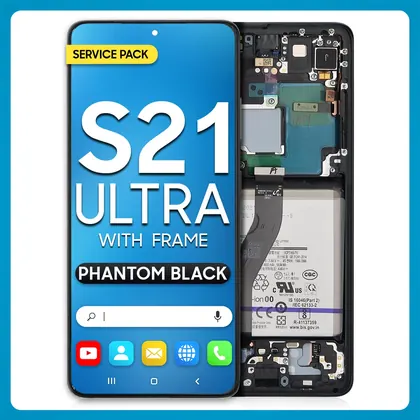
As an example of how service packs are listed, Houston-based supplier Parts4Cells groups its Galaxy service pack screens in one category, with the model, frame and color in each product name. Before you open an account with any supplier, compare stock visibility, returns and warranty terms side by side with the phone parts supplier scorecard.
How do you order the right part the first time?
- Read the SM- model code in Settings > About phone, or on the SIM tray or box if the phone is dead. Check it against the Galaxy S, Galaxy A or Galaxy Z code tables.
- Match US or international. Some S-series charging port parts come in separate US and international versions, and Galaxy A 4G and 5G variants can need different screens.
- Choose the screen type with the customer, and keep both options OLED if they use fingerprint unlock.
- Decide frame or no frame. A screen with frame arrives bonded to the midframe and avoids separating a glued OLED panel; without frame is cheaper but needs more bench time. See screen with frame or without.
- Match the color when the frame or back glass is visible.
- Read the return terms before you fit the part, because a fitted part or one with adhesive residue may not be returnable.
What should you check when the part arrives?
Check that the label or product name matches the model code on the ticket, and that the color and frame are what you ordered. Then connect the screen to the board before gluing anything and run the tests in how to check a screen before installing it. A part that fails goes back in its original packaging.
Frequently asked questions
Can a repair shop buy from Samsung's Self-Repair program?
Yes. Samsung's US Self-Repair page says the program is for individual owners and unaffiliated repair businesses. On November 15, 2026 it listed phone repair manuals for the Galaxy S25, S25+, S25 Ultra and Z Fold6 only.
What warranty do Samsung genuine Self-Repair parts have?
Samsung's Self-Repair page states a 90-day limited warranty from the date of delivery. Using or keeping the part means accepting Samsung's Terms and Conditions, which include an arbitration agreement.
Is a service pack screen the same as an OEM pull?
No. A service pack is a new screen sold in Samsung service packaging, often with the frame attached. An OEM pull is an original screen removed from another device and tested, so its cosmetic grade varies.
What does refurbished mean for a Galaxy screen?
Suppliers use the word differently. It can describe an original panel that has been reworked, for example with new glass. Ask the supplier what was replaced and how the screen was tested before you quote it as original quality.
Sources
- Samsung US: Self-Repair program (who it is for, listed phone manuals, 90-day parts warranty, terms)
- Samsung US order help: Where can I buy replacement parts? (Samsung.com or certified partner; article updated July 22, 2024)
Sources checked November 15, 2026. Program terms, model lists, prices and stock change; confirm them on the linked pages.